
Showback Is Impossible
Without consistent CostCenter / Owner / Environment tags, you cannot tell finance which team or product drove the spike. Allocation slides into "Unallocated" — the line that auditors love to flag.
Product · AWS Advanced Tier Services Partner
Untagged resource visibility, allocation gap reporting, drift detection, and policy enforcement preview. The FinOps surface that makes showback actually work.
Why tags matter for FinOps
FinOps Foundation lists cost allocation as a foundational capability for a reason. Without it, every other FinOps practice — showback, forecasting, anomaly attribution — limps.
Without consistent CostCenter / Owner / Environment tags, you cannot tell finance which team or product drove the spike. Allocation slides into "Unallocated" — the line that auditors love to flag.
An engineer leaves, the resource keeps running. Without an Owner tag, you cannot tell who owns it, who to ask before turning it off, or whether it is still needed.
Tags get applied at create-time, then drift. Six months later half your dev resources are untagged, your production tagging is 60% compliant, and nobody knows.
What Refine surfaces
Refine ingests CUR and AWS Tagging APIs across your accounts, then ranks tag gaps by dollar impact — so you fix the $4k/mo orphan before the $10/mo bucket.
Every resource missing your required tags, sortable by monthly spend. The $10/mo S3 bucket is fine; the $4k/mo EC2 instance without an Owner tag is not.
What percent of monthly spend is properly tagged. Trend over time so you see whether tagging discipline is improving or eroding.
Resources that were tagged correctly at creation but lost tags through CloudFormation drift, manual edits, or service updates.
Configure your required keys (CostCenter, Owner, Environment, Product) and watch per-key compliance climb. Each scan writes the score back, so the trend is the policy’s rather than a moving target.
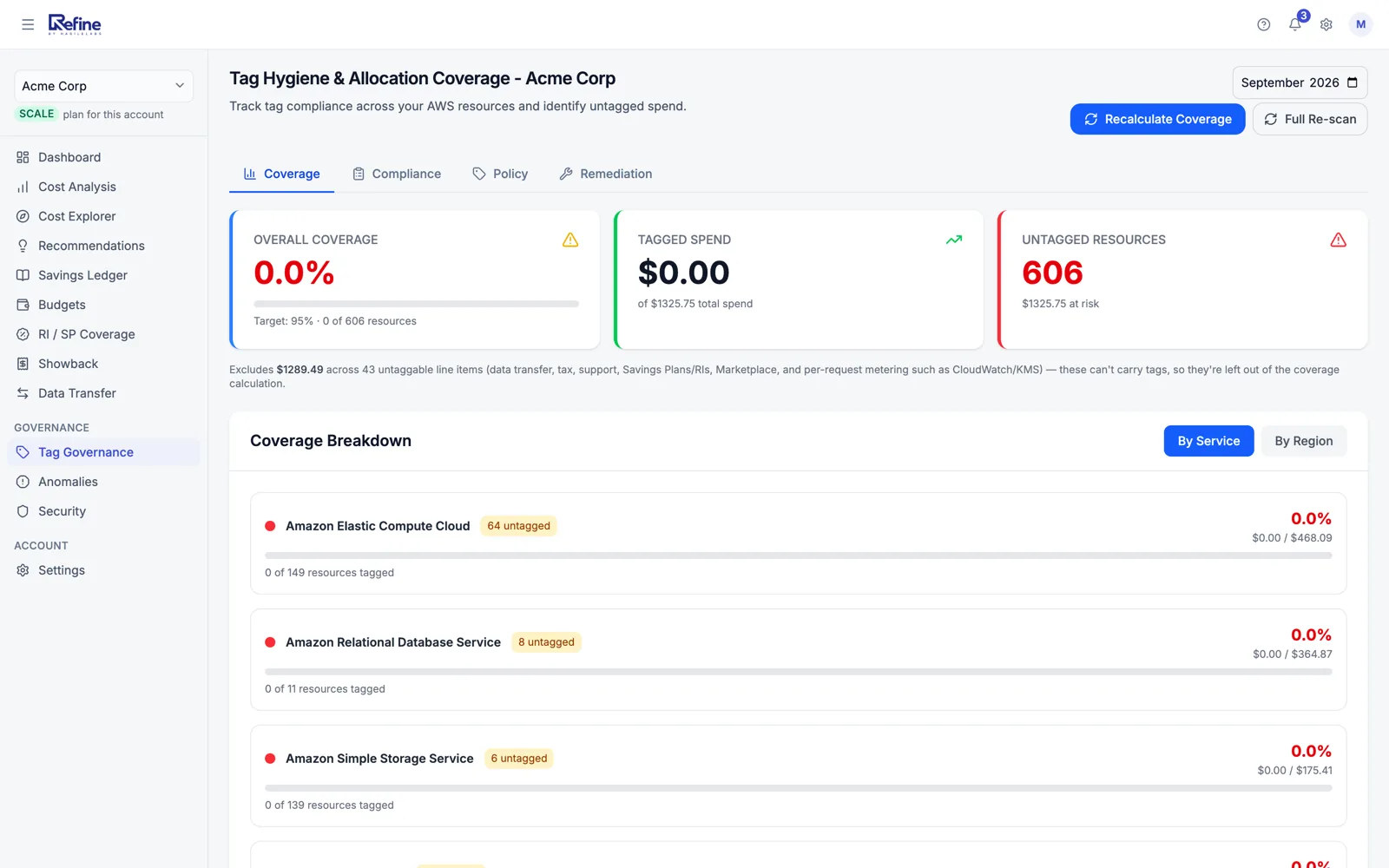
The exact shape of the view you get in the dashboard. Fix the top of the list and your allocation gap collapses.
Untagged resources (sample)
4 resources · $581/mo at risk| Resource | Spend / month | Missing tags |
|---|---|---|
EC2 instance · m5.xlarge i-0a4f9b3c2e8d1f6e | $142 | OwnerCostCenter |
RDS instance · db.r5.large rds-prod-analytics-2 | $248 | CostCenter |
S3 bucket · 8.2 TB arn:aws:s3:::data-lake-archive | $187 | OwnerEnvironmentCostCenter |
Elastic IP · unattached eipalloc-035fa17c9e2b4a17c | $4 | OwnerEnvironment |
Export the full list to CSV/XLSX for the FinOps ticket queue. Tag from within AWS, and the next sync confirms compliance.
Define your required keys, allowed values, and account-scoped overrides. Refine simulates the policy against current state and tells you exactly which resources will break before you publish.
Policy preview · prod accounts
Dry-runTop non-compliant
Apply policy? Compliance climbs to 91% projected after first remediation pass.
Growth and up
Select the violations and Refine generates the fix as a file you run: a ready-to-run AWS CLI script, or a Terraform patch for a team whose change process goes through review. You run it with your own credentials.
Because writing a tag needs tag:TagResources plus a permission per service, and we do not ask for those. Refine onboards with a read-only role, and that boundary is worth more to you than a button — it is also the honest reason we can be given access to a production account on a Friday.
Growth and up
Tagging is the means; this is the end. Split the bill by the dimension your org actually organises around, decide what happens to the costs no tag can attribute, and mail each team the number they recognise as theirs.
Allocate by account or service, or by any tag key — team, cost centre, product. The dimension is the report’s, so finance and engineering can each have the cut that makes sense to them from the same bill.
Refine proposes which services are shared by nature from the ones on your own bill, so the first preview is sensible rather than empty. Then you fix it — every org names these differently, and a silent guess is worse than one you can see.
What you see on screen is computed by the same allocator that produces the emailed report. A preview built a second way would let the screen and the pack disagree, which is exactly the thing a chargeback report cannot afford.
The allocated total is checked back against the source total, so the split adds up to the invoice and any residue is visible rather than absorbed.
Pick the day of the month and who receives it. Each team gets its own allocation on a cadence, instead of a quarterly spreadsheet somebody has to remember to build.
Summary and per-resource detail export together, so the number in the email and the number in your finance system come from the same run.
No tag can attribute them, so every showback tool has to decide something. Refine makes it your decision, per report:
Whichever you pick, the allocated total is reconciled back against the source bill — a chargeback number finance can challenge is one you can defend line by line.
Customer outcome
45% cost reduction
Allocation jumped 41% → 89%
"Before Refine, half our prod EC2 went to "Unallocated" on the showback report. After two weeks of tag cleanup with the untagged-by-spend list, we had real attribution — and the savings work could finally target the right teams."Read the story
Connect AWS. See untagged spend in 60 seconds. Free under $2,000/month of AWS spend.
Refine is built and supported by HabileLabs, an AWS Advanced Tier Services Partner.