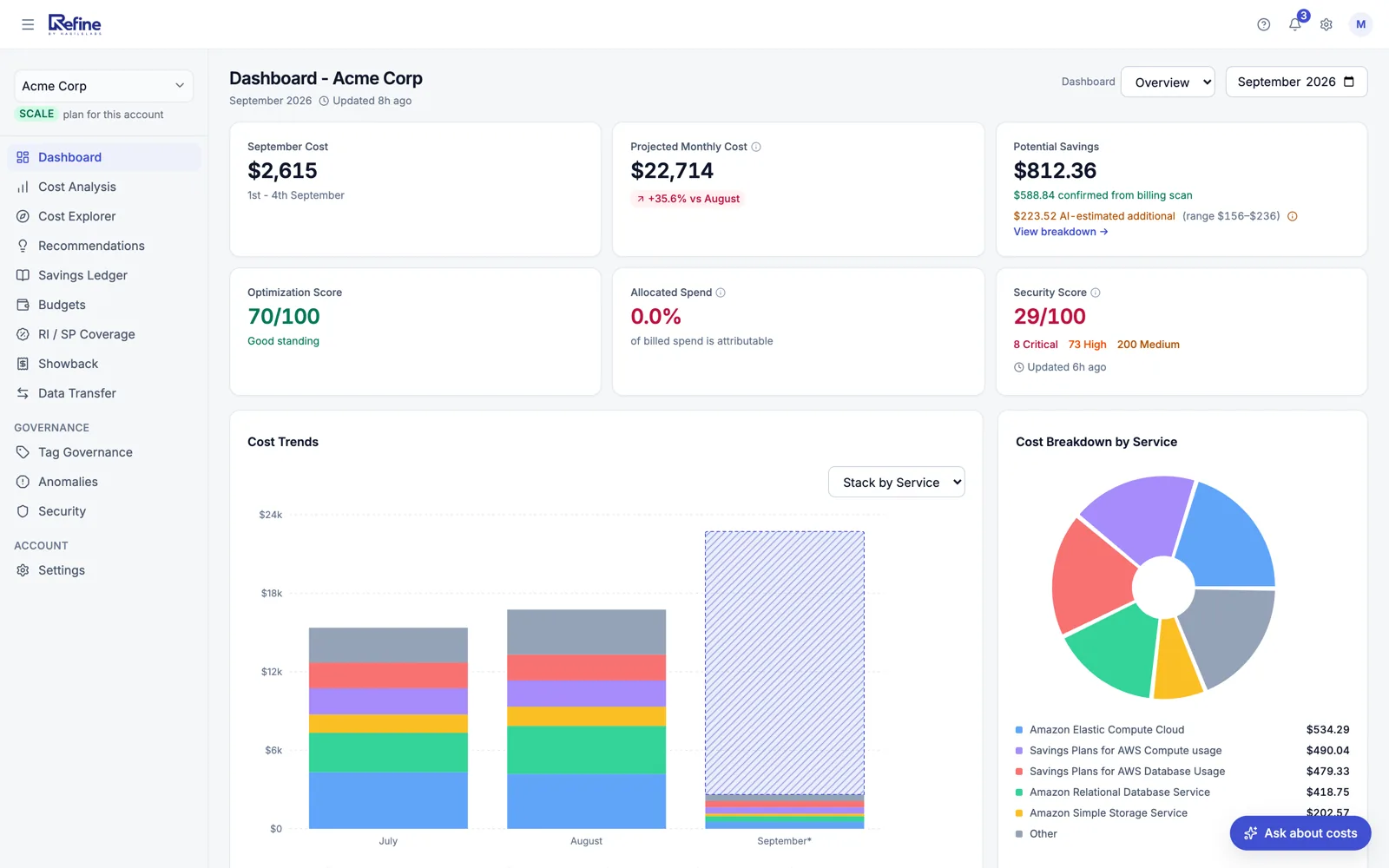
Four widgets do the heavy lifting. Click any number for the detail.
1234
1
Projected Monthly Cost
Where the month lands if usage holds, with the change against last month — surprises caught before invoice day, not after it.
2
Potential Savings
Split into what a billing scan confirmed and what the model estimates on top, so you can see which half is evidence and which is inference.
3
Optimization Score
Single 0-100 number for monthly spend efficiency. Drill down to the recommendations driving the score.
4
Cost Trends
Spend stacked by service, with the unfinished month projected from its run-rate, so a step change is attributable to the service that caused it.
Four capability blocks
How Refine turns the bill into action
Narrative reports, service-led recs, forecasts, and a single score. The same engine that runs against connected accounts also runs against uploaded bills.
AI Narrative Reports
A 60-second plain-English summary of where money is going and what to do about it — in your inbox or on the dashboard.
Top cost drivers by service, region, and account
AI commentary explaining month-over-month changes
Plain-English recommendations ranked by dollar impact
Schedulable daily, weekly, or monthly
Service-Led Recommendations
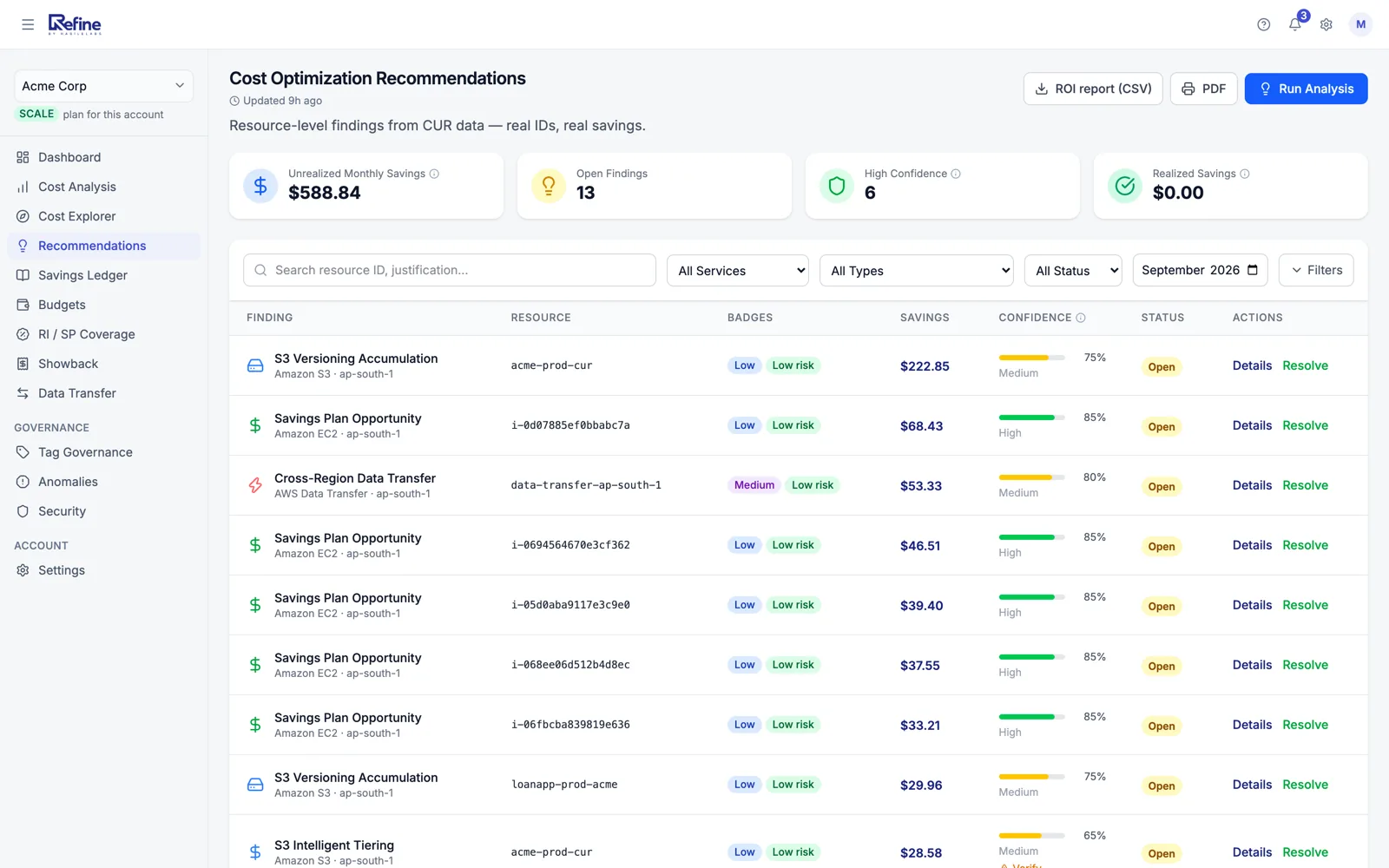
Per-service breakdowns with the moves we already know work — right-sizing, idle resources, storage class moves.
EC2 right-sizing with workload-aware suggestions
EBS volume gp2 → gp3 migration opportunities
S3 storage class lifecycle moves
RDS instance class downsizing
Reserved Instance / Savings Plan coverage, utilization and purchase recommendations — with a planner that sizes the commitment
Forecasts
Don't get surprised by the bill. Projected monthly cost and budget-vs-actual show where you'll land, today.
Projected monthly cost KPI on the dashboard
Monthly Totals chart with historical and projected spend
Budget vs actual per account, service, or tag
Per-service trend lines for spot-checking
Optimization Score
A single 0–100 number that tells you how close you are to efficient. Trend over time so you know you are moving in the right direction.
Weighted by potential savings, not just count of issues
30-day rolling trend with daily snapshots
Drill from score → contributing recommendations
Pairs with Security Score for one-glance health
After the report
The part most tools stop before
A report tells you what is wrong once. These are the surfaces that keep working after you have read it — investigating a number, deciding about a recommendation, and proving later that the decision was worth it.
Cost Explorer, and a question box
Pivot by service, region, resource or any tag key; compare two periods; save the view you keep rebuilding. Or just type "RDS cost last 3 months" — the question becomes a query, never an answer, so the same deterministic engine computes the number and what you read always matches the table.
A recommendation you decided about stays decided
Accept, snooze or dismiss with a reason, and the decision is keyed to the finding rather than to the month. Next month’s rescan does not hand you back the thing your team already looked at and said no to.
A savings ledger, not a savings rate
Most tools publish what is coming off your bill this month. This publishes the lifetime total, built from verification records rather than projections — each month expandable to the fixes behind it, both measurement windows, and the method, so you can re-derive it from your own FOCUS export.
Where the bytes went
Data transfer is the line nobody can explain and everybody pays. Refine breaks the flows out and ranks them, so an inter-AZ chat between two services shows up as a number with a name on it.
Every finding names the resource, the monthly saving and a confidence score — and says plainly when confidence is low enough that you should verify in the console first. Resource identifiers here are synthetic.
How the Optimization Score is computed
Methodology, calibration, and how to move the number.
Example
76/ 100
+6 in 30 days. After applying the top 3 right-sizing recs and tightening S3 lifecycle.
All open recommendations, weighted by potential monthly dollar savings. A recommendation worth $1,000/month counts ten times more than one worth $100/month — so the score reflects opportunity, not noise.
100 means we found no meaningful savings — your spend looks efficient. 0 means we found savings equal to your monthly spend (rare). Most accounts land in the 60–85 range and improve over weeks as recommendations get applied.
Open the highest-dollar recommendations first. Score recomputes daily, so you see movement within a day of applying changes. Apply, snooze, or mark-resolved from inside the dashboard.
Yes — mute per-recommendation, per-account, or org-wide. Muted recs remain visible but stop counting against the score and stop appearing in narrative reports.
A first-pass narrative is ready within 60 seconds of connecting. Full resource-level recommendations populate within a few minutes as we walk your CUR — typical accounts complete in under 10 minutes.
Yes — CUR is the primary data source for resource-level recommendations and forecasting. If your account does not have CUR enabled, we still produce service-level recs from Cost Explorer; resource-level recs require CUR.
No. Refine connects through a read-only role and never writes to your AWS account — that is a product boundary, not a gap. What you get instead is the work already done: a security finding carries the exact AWS Console steps for that resource and region plus the official AWS doc, and a tag violation exports as a ready-to-run AWS CLI script or Terraform patch that you apply with your own credentials.
Yes — the narrative report exports to PDF; recommendations export to CSV or XLSX. Useful for sharing with finance and for tracking what was applied between months.
The savings ledger derives from verification records rather than from projections: when a recommendation is actioned, its projected saving is snapshotted, and the realized figure is measured against that stable baseline afterwards. Each month expands to the fixes behind it and the method used, so you can re-derive the total from your own FOCUS export instead of taking ours on trust.
SeethecostdriversalreadyhidinginyourAWSbill
Free under $2,000/month of AWS spend. Read-only access. Revoke anytime.